I once watched a 60-person industrial supplier buy a CRM to fix a forecasting problem. Six months later the forecast was worse, the reps were logging in once a week to paste numbers into a spreadsheet, and the sales manager had started calling the system “the tax.” Nothing was wrong with the software. The company had automated a pipeline nobody had ever agreed on.
That pattern has followed me through enough rollouts that I now ask a different set of questions before a customer relationship management project begins. Not “which vendor?” but “who owns this, what decision does it support, and what will we stop doing?” The answers predict more about the outcome than any feature comparison.
What a CRM actually does
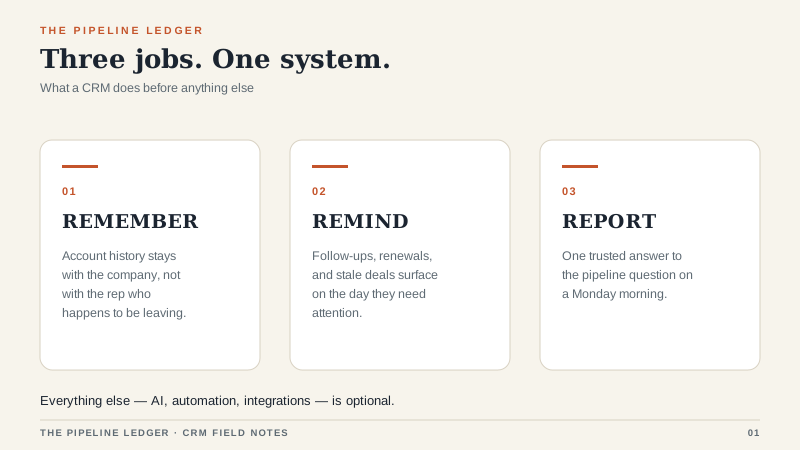
Strip away the launch deck and a CRM does three jobs.
It remembers. Every call, email, quote, and promise sits in one place, attached to a company and a person. When a rep leaves, the account history stays. That sounds mundane until a $400,000 renewal depends on a conversation that happened two years ago and the only person who remembers it has a new job.
It reminds. Follow-ups fire on schedule. A deal that has sat untouched for eighteen days shows up in a list. Renewals surface before they lapse. This is the part that pays for the license in the first month, and the part most teams underuse. In one 25-seat distribution team I worked with, turning on a stale-deal alert cut average response time from nine days to two. Nobody bought a new tool to get that result. They just used the reminder they already owned.
It reports. Not dashboards for their own sake, but the ability to answer a specific question on a Monday morning: which forecast deals have not had a real conversation in three weeks? A report that settles one argument people actually have is worth more than twenty charts nobody opens.
Everything else, the AI summaries and conversation intelligence and the twelve-tab contact record, is optional. Nice when it works. Never the reason the project succeeds or fails.
Where the project goes wrong
The failure modes are boringly consistent. In the rollouts I have been called into after the fact, four causes explain almost all the damage.
Nobody owned it. A CRM without a named internal owner becomes everyone’s side project and no one’s job. Six months in, no one can explain why a required field exists. I now ask who will own the system before I ask what the system will do. If the answer is “IT” or “the sales ops person” with no name attached, I get nervous.
The data was dirty on day one. Duplicate accounts, three spellings of the same customer, contacts attached to the wrong company. Migration exposes all of it, and teams respond by postponing cleanup. That just moves the pain into the system where it is harder to fix. I would rather delay a go-live by two weeks and dedupe than spend two years apologizing for a pipeline that contains both “Acme” and “ACME Corp.”
The fields multiplied. A sales leader asks for one report, an engineer adds four fields to support it, and two years later reps face thirty inputs before they can save a note. Every required field is a small tax on the person doing the work. Collect enough of them and the tax becomes the job.
Nobody trained the second wave. Launch training covers the people in the room. It rarely covers the hire who starts in month seven, and by then the person who built the system has moved on. A one-page field guide and a fifteen-minute onboarding session for every new rep are cheap insurance.
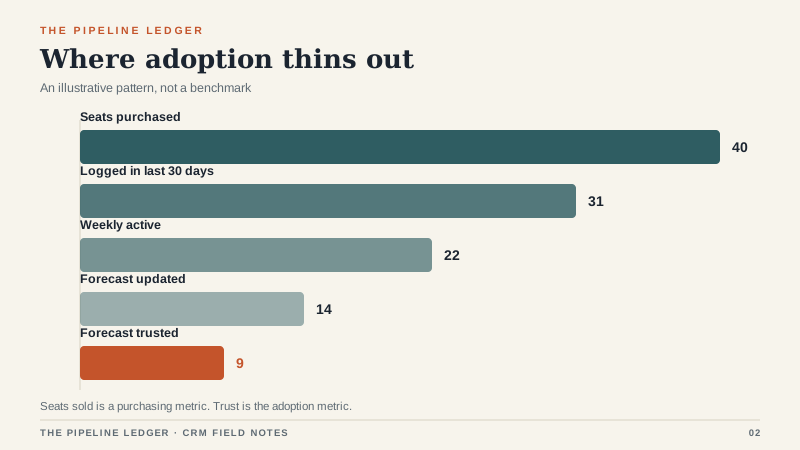
The funnel above is the number I wish more buyers tracked. It is an illustration, not a benchmark, but the shape is familiar. A system can be fully deployed and still be ignored. Adoption is not a training problem at that point. It is a design problem.
What it costs in the US
For a 20 to 50 person B2B sales team, plan on $40 to $90 per user per month for a mainstream CRM at a mid-tier edition. That is the easy number. The harder ones:
- Implementation: $8,000 to $40,000 for a first build, depending on integrations and how much of your process needs to be rethought.
- Admin time: a half-time administrator once you pass roughly 25 users. If you skip this, the system slowly rots.
- Integrations: $3,000 to $15,000 per meaningful connection, whether that is an ERP, a quoting tool, or your phone system.
- Switching later: exporting your own data should be free and often is not. Ask about it before you sign.
I have seen a 30-seat deployment land at $54,000 in year one all-in and a comparable one land at $180,000. The difference was almost never the software. It was scope discipline. If you are weighing Salesforce specifically, I have written separately about its editions and where its budgets leak.
Do you actually need one?
You need a CRM when the answer to “what happened with that account” depends on who you ask. You need one when two reps have called the same prospect in the same week. You need one when your forecast is a spreadsheet that three people maintain and nobody believes.
You probably do not need one when you are a team of three selling to people you talk to weekly, and the spreadsheet is accurate. A CRM adds structure, and structure has a cost. If your process is simple enough to hold in your head, hold it there a while longer and spend the money on lead generation. The same logic applies when you are comparing the best CRM software for a bigger team: fit beats feature count, and it is not close.
The rollout I would run
Start with one pipeline and one report. Not four pipelines, not a custom object model, not a territory hierarchy. Pick the deal stages your team already uses in conversation, name them the way your team names them, and load only the accounts that are live right now. Historical data can come later, and often should not come at all.
Then give two reps a week to work real deals in the system while someone sits next to them. Watch where they hesitate. That hesitation is your build backlog, and it is worth more than any requirements document. One rep will try to keep a parallel spreadsheet. Find out why. Usually it is one report or one field that does not match how they think about the work.
Roll out to the rest of the team once those two reps can run a full week without opening the spreadsheet. Not before. A CRM that arrives with unresolved friction teaches everyone to route around it, and routing around it is a habit that is very hard to undo.
What good looks like six months in
Not a wall of dashboards. Good looks like a sales manager opening one pipeline view before the Monday call and trusting it. It looks like a new rep finding the last three conversations with an account in under a minute. It looks like a forecast that is wrong for explainable reasons instead of mysterious ones.
A CRM is a commitment machine. It makes promises visible: to customers, to managers, to the person who has to follow up. Buy one because you want that visibility. Do not buy one because a spreadsheet feels unprofessional. The spreadsheet is not the problem. The disagreement underneath it is.
