A six-person landscaping company I know ran its entire sales operation on a free CRM for two years. It worked, mostly. Then the owner started spending Sunday mornings copying leads from a web form into the CRM by hand, because the free plan had capped the automation that used to do it. He was saving $75 a month and spending four hours a week on work the software used to handle.
Free CRM is not a trick. There are genuinely useful free plans, and a free CRM for small business can run the sales operation for a long time. The question is not whether free works. It is when free stops being cheaper than paid.
What “free” usually means
Every free CRM has a business model. Usually it is one of four: a seat cap, a record cap, a feature cap, or a branding cap. Sometimes it is all four.
Seat caps. The plan is free for one, two, or three users. The fourth user triggers a paid plan. For a solo founder or a two-person sales team, that can last for years. For a team that is hiring, it is a countdown.
Record caps. Free plans often limit contacts, companies, or deals. A cap of 500 records sounds generous until you realize that every lead, customer, and vendor counts. A home services company can hit 500 in a few months.
Feature caps. Automation, custom fields, reports, email sequences, integrations, and support are the usual levers. The free plan gives you enough to run a simple pipeline and enough friction to make you consider upgrading when the work gets real.
Branding and support. Some free plans put the vendor’s brand on customer-facing forms or emails. Some limit support to community forums. Neither is unreasonable. Both matter when a lead cannot reach you.
The free plans worth a look
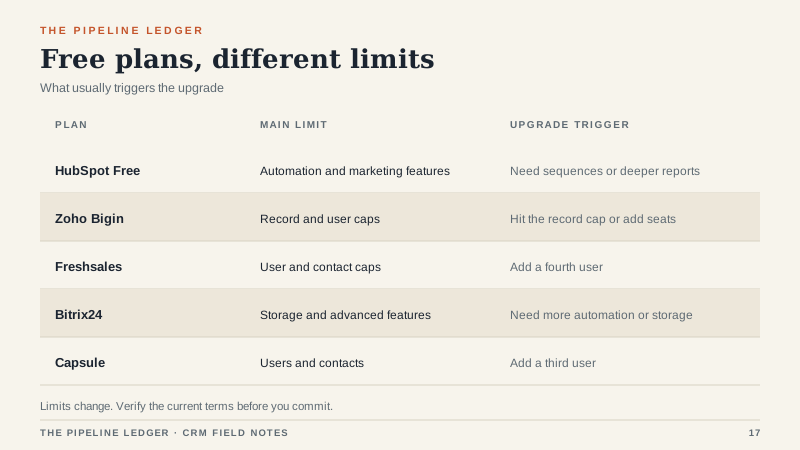
These are the plans I see most often in small businesses. Limits change, so verify the current terms before you commit. The categories are more stable than the exact numbers.
HubSpot free CRM. The most complete free option for a small team. Contact and deal management, email tracking, forms, landing pages, and basic reporting. The free plan stores a large contact database, but marketing features and automation are capped. It is a strong starting point if you may eventually pay for a fuller platform; I break down the paid tiers in the HubSpot CRM guide.
Zoho Bigin. A lightweight CRM aimed at small teams, with a free plan that caps the number of records and users. The paid plans are inexpensive, and the interface is simpler than Zoho’s larger CRM. Good for a team that wants a clean pipeline without a lot of configuration.
Freshsales. A free plan for a small number of users with a contact cap and limited automation. The paid tiers are reasonably priced, and the product is part of a larger suite if you need support or marketing later.
Bitrix24. A broad collaboration and CRM suite with a free plan that is generous on users but limited on storage and advanced features. It can be a lot of product for a small team, which is both the appeal and the risk.
Capsule. A simple CRM with a free plan for a very small team and a modest contact limit. It is clean and easy to learn, which is often more valuable than a longer feature list.
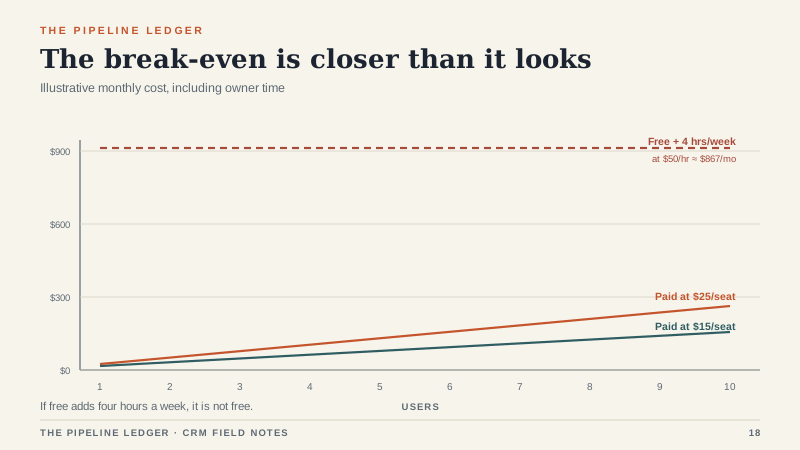
Pipedrive. No permanent free plan, but a trial and relatively low-cost paid tiers. I mention it because a $15-per-seat plan can be cheaper than the hidden cost of a free tool that forces manual work.
The hidden costs
The subscription is free. The work is not.
Owner time. If the free plan forces four hours of manual work a week, and the owner’s time is worth $50 an hour, that is $10,400 a year. A paid plan at $20 per seat for three users is $720 a year. The math is not close.
Duplicate cleanup. Free plans often have weaker deduplication and data-quality tools. Duplicates accumulate, reports get messy, and someone eventually spends a weekend cleaning the database.
Migration. If you start free and move later, you will pay for migration in time or money. Ask whether the free plan lets you export everything, including activities and notes, in a usable format.
Lost leads. A capped automation that stops assigning leads is not a software problem. It is a revenue problem. The cost of one missed job can exceed a year of paid seats.
Upsell triggers. Free plans are designed to make the next tier feel necessary at the moment you are busiest. That is not sinister, but it is predictable. Know which limit will push you before it pushes you.
When free is enough
Free is a good fit when you have three or fewer users, one simple pipeline, low lead volume, no automation requirements, and no need to connect an ERP, phone system, or marketing platform. If your process fits in your head and the free plan’s limits are not forcing manual work, stay free. There is no prize for paying early.
Free is also a sensible trial. Run your real deals in it for 30 days before you buy anything. You will learn more about the interface from a month of real use than from any demo.
When to pay
Pay when you hit a limit that costs more than the subscription. The usual triggers are a fifth user, a lead volume that requires routing, a report the owner needs weekly, an integration with accounting or a phone system, or a support issue that blocks a deal. At that point, compare paid plans on total cost, not sticker price.
For most small businesses, a paid plan at $15 to $30 per user per month is enough. You do not need the enterprise tier. You need a system that keeps the pipeline accurate and gets out of the way.
A sensible path
Start with a free plan and real data. Test the export before you invest. Model the paid tier you would move to at five users and 1,000 records. If the number is affordable and the features match how you sell, move when the limit starts costing you time. Clean your data before you migrate, not after. And negotiate the annual price; even small vendors have flexibility.
The landscaping owner eventually moved to a $25-per-seat plan for three users. He got the automation back, stopped working Sundays, and paid less than the value of the hours he reclaimed. Free was a fine place to start. It was a bad place to stay once the work outgrew it. If you are ready to compare paid options, the team-profile shortlist is the next step.
