Every “best CRM software” list I read tells me more about the reviewer’s sales motion than about the software. The affiliate sites like whichever vendor pays the most. The enterprise analysts like whichever vendor passes procurement. The productivity bloggers like whichever tool has the prettiest board. None of them are selling your product to your customers.
I have spent fifteen years walking into sales teams after the decision was made, usually because it was made badly. The pattern is consistent: the team bought the demo, not the fit. This is the process I use to avoid that, in the order I use it.
Start with the deal, not the software
Before you look at a single vendor, answer five questions about how you actually sell.
- How many people touch a deal before it closes? One rep, or a rep plus a solutions engineer plus a manager plus finance?
- How long is the cycle? A two-week transactional sale and a nine-month enterprise sale need different data models.
- How many deals does each rep run at once? Ten complex deals and two hundred small ones are different operational problems.
- Where does the deal start and end? Marketing, outbound, partners, ecommerce, or a store counter?
- What happens after the sale? Renewals, service, and account expansion often decide whether the CRM is actually useful.
Write the answers down. Then write the three questions the CRM must answer every week. Mine are usually: which deals are at risk, which reps need help, and what will close this quarter. If a vendor cannot show you those three answers with your data, the demo is theater.
The five filters
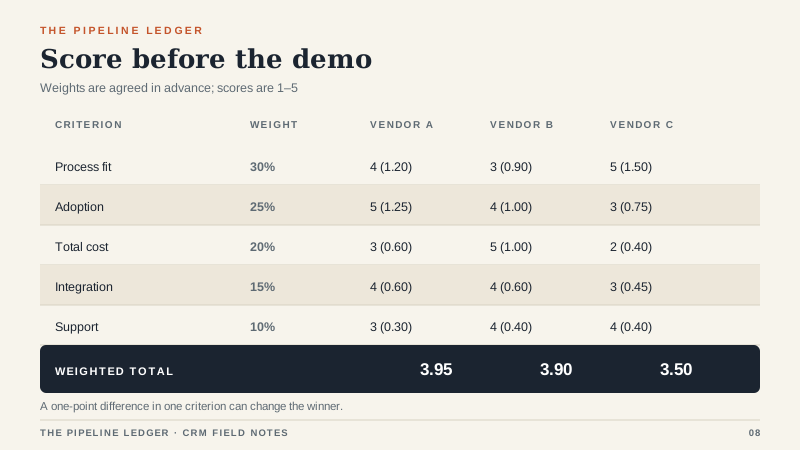
I evaluate every CRM against five filters, in this order.
Process fit. Can the system represent how you sell without a hundred custom fields? A CRM that requires you to change your sales process to match its object model is a bad trade. The system should absorb your process, not the other way around.
Adoption. Will a busy rep use it without being chased? Look at mobile, data entry speed, email integration, and the number of clicks between a call and a logged note. Adoption is a design outcome, not a training outcome.
Integration. What has to connect, and who owns the connection? Your ERP, quoting tool, phone system, marketing automation, and data warehouse are the usual suspects. Ask what is native, what needs middleware, and what needs a developer.
Total cost. Not the per-seat price. Licenses, implementation, admin time, integrations, training, migration, add-ons, and renewal uplift over three to five years.
Exit. Can you get your data out, in a usable format, without paying a professional services fee? A CRM you cannot leave is a subscription with extra steps.
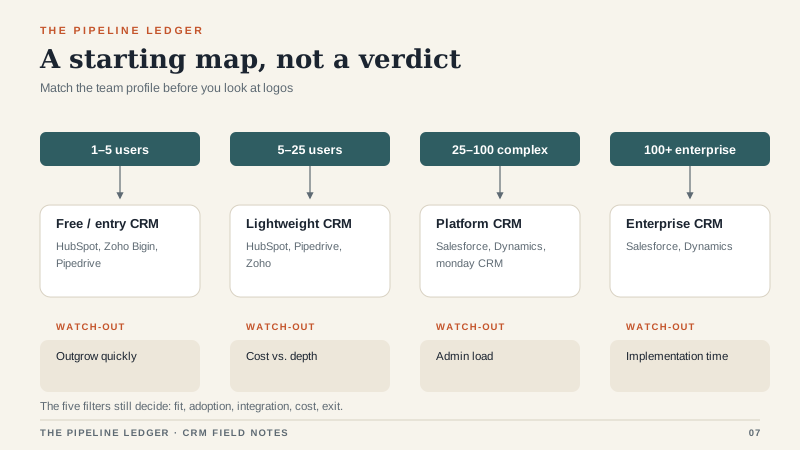
What the shortlist looks like by team profile
I do not believe in a single ranking, but I do believe in starting points. These are the categories I would shortlist for different teams. The specific vendor matters less than the category.
One to five users, founder-led sales. Start with a free or low-cost CRM: HubSpot’s free tools, Zoho Bigin, or Pipedrive on a starter plan. The priority is speed and zero admin. You can outgrow any of these, and that is fine.
Five to twenty-five users, B2B with a marketing motion. HubSpot, Pipedrive, and Zoho are the usual shortlist. HubSpot wins when marketing and sales share the record. Pipedrive wins when the sales process is simple and the team hates clutter. Zoho wins on price and breadth, provided you can live with its interface.
Twenty-five to one hundred users, complex sales. Salesforce and Microsoft Dynamics 365 Sales are the serious contenders. monday CRM can work if your process is project-like and your reporting needs are modest. At this size, the admin role matters as much as the software.
Field sales and territories. Salesforce, Dynamics, and Pipedrive all handle mobile and territory basics. The deciding factor is usually offline access and how the team logs visits. Test the mobile app on a real phone, in a parking lot, with bad service.
Ecommerce and high-volume transactional sales. HubSpot is the common choice, especially when marketing and service share the record. If your volume is enormous, check API limits and per-record pricing before you commit.
Dealerships and other vertical sales. General CRMs usually miss the workflow. Automotive retail needs desking, F&I, inventory, and service integration; a dealership CRM is a different category. I have written about that separately. For a profile-first version of this shortlist, see Best CRM by Team Profile.
The demo script that exposes the truth
Do not let the vendor drive the demo. Bring three real deals, one clean, one messy, one stuck, and ask the rep to enter them live. Then ask for the pipeline view your sales manager will use on Monday. Then ask for the forecast report your CFO will ask about on Thursday.
Watch for these moments:
- How many clicks does it take to log a call and set a follow-up?
- Can the rep see the last email and the next task on one screen?
- Does the mobile app work without a signal?
- Which of these features cost extra?
- What is the API limit, and what happens when we hit it?
- Can we export every record and every activity, and in what format?
- Who owns the implementation, and what is the fixed fee?
A good sales engineer will answer all seven without flinching. A bad one will say “we can build that” four times. Each “we can build that” is a project you are buying.
How to model five-year cost
Build a simple spreadsheet with seven rows: licenses, implementation, admin time, integrations, training, migration, and renewal uplift. Then add a contingency line of 15 percent. The contingency is not pessimism. It is the historical average for scope you did not know you had.
For a 25-seat team, a lightweight CRM might land at $45,000 over five years all-in. A mid-market platform might land at $150,000. An enterprise platform with a partner implementation might land at $300,000. None of those numbers are inherently wrong. They are only wrong if you are paying for capability you will not use.
Red flags
“Unlimited customization.” Unlimited customization means unlimited maintenance. What you can build, you must maintain.
“We’ll build anything you need.” Translation: the implementation will be a professional services project with a change-order process. Price it before you sign, not after.
No export commitment. If the contract does not say you can export all your data at any time, in a standard format, for free, assume you cannot.
Mandatory onboarding. A required onboarding fee can be legitimate. A required onboarding fee that is 40 percent of year-one cost is a signal that implementation is harder than the demo suggested.
Per-record pricing. It can be fine. It can also punish success. Model what happens if your contact database triples.
Roadmap promises. A feature that ships next quarter is not a feature you can plan around. Buy what exists today.
The decision
Pick the system your team will still use in month nine. Not the one with the best demo, the biggest logo, or the most checkmarks. The one whose data model matches your deal, whose mobile app a rep will actually open, and whose total cost you can defend to a CFO.
Then do the unglamorous work: one pipeline, one report, two pilot reps, a thirty-day check. Any decent CRM can work under those conditions. Most bad CRM decisions fail under them, too, which is useful information while you still have time to change your mind.
