The first time I inherited a Salesforce org, it had 47 required fields on the opportunity object and 112 active automation rules. The previous admin had left six months earlier. The sales team had adapted by treating the CRM as a logging tax: enter the minimum, close the tab, do the real work in email.
I have since inherited quite a few SFDC orgs, and the pattern rarely changes. The technology is not usually the problem. The problem is accumulated decisions, made by people who are no longer there, for reasons nobody wrote down. Running an inherited org is a different skill from building a new one. It starts with reading the history before you rewrite it. If you are still choosing an edition rather than fixing one, start with the Salesforce edition and cost guide.
What SFDC means
SFDC is shorthand for Salesforce.com. People use it to refer to the company, the platform, or a specific Salesforce instance. An “SFDC org” is your company’s instance: its objects, fields, users, automation, integrations, reports, and permissions.
It is not an edition. It is not a product you can buy. If a job posting says “SFDC CRM experience,” it means Salesforce platform experience, usually Sales Cloud or Service Cloud. If a consultant says “your org,” they mean the instance you are paying for.
That vocabulary matters because inherited-org work is mostly about the instance, not the vendor. Salesforce will keep shipping features; your org’s problems are local. For the commercial pressures behind those features, see what the NYSE: CRM ticker tells buyers.
What is actually inside an org
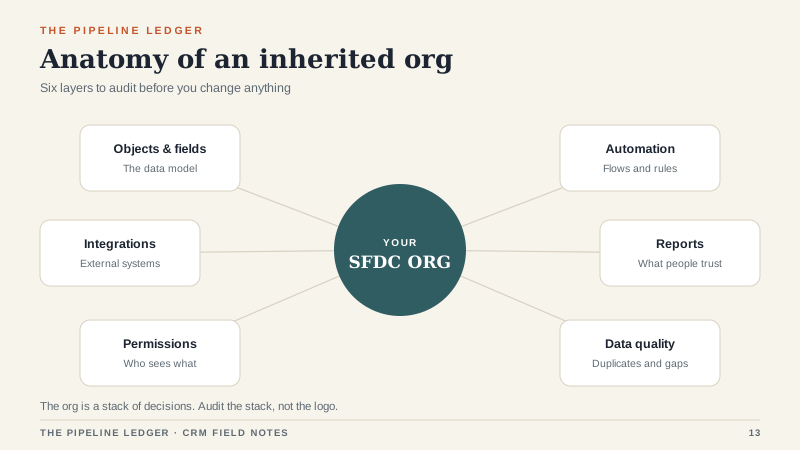
Every Salesforce org is a stack of six things. Understanding the stack makes the audit easier.
Objects and fields. Standard objects like Account, Contact, Opportunity, and Case, plus custom objects your team built. Every field is a decision someone made. Forty-seven required fields is not a data model. It is a negotiation with the past.
Automation. Flows, validation rules, approval processes, and whatever remains of older tools. Each automation was built to solve a problem. Some of those problems no longer exist. Some of the automations now conflict with each other.
Integrations. Connections to your ERP, marketing platform, quoting tool, phone system, data warehouse, and whatever someone connected with Zapier at 11 p.m. Integrations fail silently, and nobody owns them after the consultant leaves.
Reports and dashboards. Usually too many, with names like “Pipeline (final) v3” and “Bob’s forecast copy.” Report sprawl is a symptom of unclear ownership, not a reporting problem.
Permissions. Profiles, permission sets, roles, sharing rules, and the one user who can see everything because nobody wanted to fix their access. Permission debt is a security issue and an adoption issue at the same time.
Data. Duplicates, orphaned contacts, stale opportunities, and fields that were filled in once during a migration and never again. Data quality is the quiet tax on every report.
The first 90 days
I run inherited-org work in four phases. The order matters more than the speed.
Weeks 1 and 2: inventory. Count objects, fields, automation, reports, integrations, and active users. Do not change anything yet. You are taking stock, not remodeling.
Weeks 3 and 4: usage. Find out what people actually use. Pull login data, report access, and field completion rates. Interview three reps, one manager, and one person in finance. The gap between what the org contains and what people use is your opportunity.
Weeks 5 to 8: cleanup. Retire dead automation. Remove required fields that no report needs. Merge duplicates. Fix the permissions that make people share logins. Rebuild one dashboard that a manager will actually open.
Weeks 9 to 12: stabilize. Document the data model, name an owner for every integration, create a change process, and set a rule: no new required field without a named report that uses it. Then tell the team what changed and why.
The audit checklist
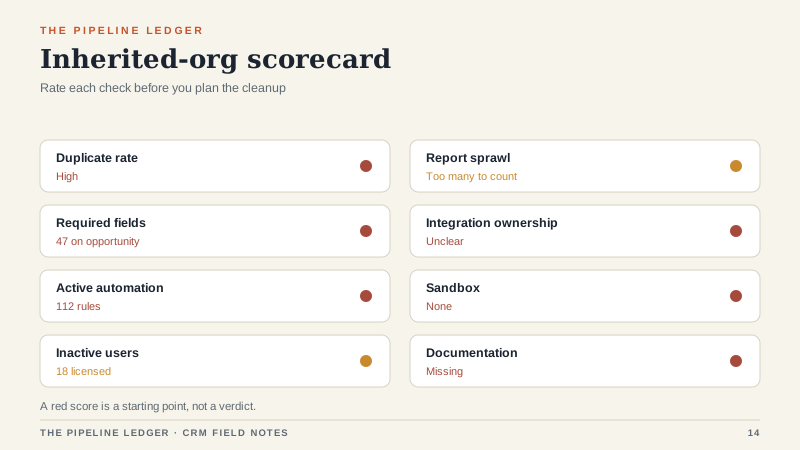
These are the eight checks I run first. A red result is not a crisis. It is a priority.
- Duplicate rate. What percentage of accounts and contacts are duplicates? If it is above 5 percent, reporting is already lying to you.
- Required fields. Which fields are required, and which reports use them? Remove any field that cannot justify itself.
- Automation inventory. How many flows and rules are active, and when did each last fire? Retire the ones that have not fired in 90 days.
- Inactive users. Who has a license but has not logged in for 30 days? Reclaim the seat or find out why.
- Report sprawl. How many reports are shared with the whole company? Which ones have been opened in the last quarter?
- Integration ownership. Who owns each connection, what happens when it fails, and where is the documentation?
- Sandbox. Do you have a safe place to test changes? If not, every change is a production experiment.
- Documentation. Can a new admin understand the org without interviewing three former employees?
What to fix first
Resist the urge to rebuild everything. The highest-return fixes are usually the least glamorous.
Freeze new fields. Announce a 60-day freeze on new custom fields. This stops the bleeding while you clean up the existing model. People will complain about one request. That is the point.
Retire dead automation. Every automation that no longer serves a purpose is a future failure. Turn it off in a sandbox first, then in production. Keep a list of what you disabled and why.
Cut required fields. Required fields are the highest-friction part of any CRM. Keep the ones that support a real report or a real handoff. Make the rest optional. Adoption usually improves within a week.
Dedupe before you report. Any dashboard built on dirty data will be distrusted. Dedupe accounts and contacts, then rebuild the one report the sales manager actually uses.
Document the org. A one-page data model and an integration map are worth more than a 40-page admin manual nobody reads. Update them when things change.
What not to do
Do not start with a big-bang rebuild. The team has learned to work around the current system. If you remove the workarounds before you replace them, you will lose the team before the new process ships.
Do not rip out everything the previous admin built. Some of it is load-bearing. The 47 required fields are a problem, but one of them probably supports a compliance report. Find that one before you delete the other 46.
Do not blame the last admin. They inherited a different set of constraints. The useful question is what the org needs now, not who made the mess.
Do not buy another tool to solve a process problem. If the sales team does not agree on what a qualified opportunity is, a new CRM will just record the disagreement in a different database.
Questions for the outgoing admin
If you have access to the person who built the org, ask these before they disappear: Which automation is load-bearing? Which integration fails most often? Which report does the CFO trust? Which fields are required by a system outside Salesforce? What would you fix first if you had a month? What would you never touch? The last two answers are usually the most valuable.
If the outgoing admin is already gone, look for a partner or consultant who has worked on the org before. An hour of institutional memory is cheaper than a week of reverse engineering.
The inherited org is a history
Every field, flow, and report is a decision someone made. Some were good. Some were made under deadline pressure. Some solved a problem that no longer exists. Your job is not to erase the history. It is to decide which parts of it still serve the team.
That is slower than a rebuild and less exciting than a migration. It is also how you turn an inherited SFDC org from a tax into a system people trust.
